How to check that a PDF is really redacted
By Julien Kilo, creator of Rature · · 7 min read
Why a black box does not hide the text
A PDF stacks several layers: text, images, drawn shapes. A black box added in Word, in a PDF reader or in Preview is one more shape, placed over the text. Black highlighting only changes the background color. Either way, the text stays in the file: copy and paste, a search or an AI assistant read it without difficulty.
A real redaction removes the text from the file, then draws the black block in its place.
Professionals make this mistake too:
- January 2019, Paul Manafort's lawyers. A filing in US federal court contained hidden passages that a simple copy and paste made readable (Atlanta Journal-Constitution).
- December 2025, Epstein files. In some documents released by the US Department of Justice, the text under the black boxes could be recovered the same way (Mediaite).
Our test: a contract redacted in Word, read by ChatGPT
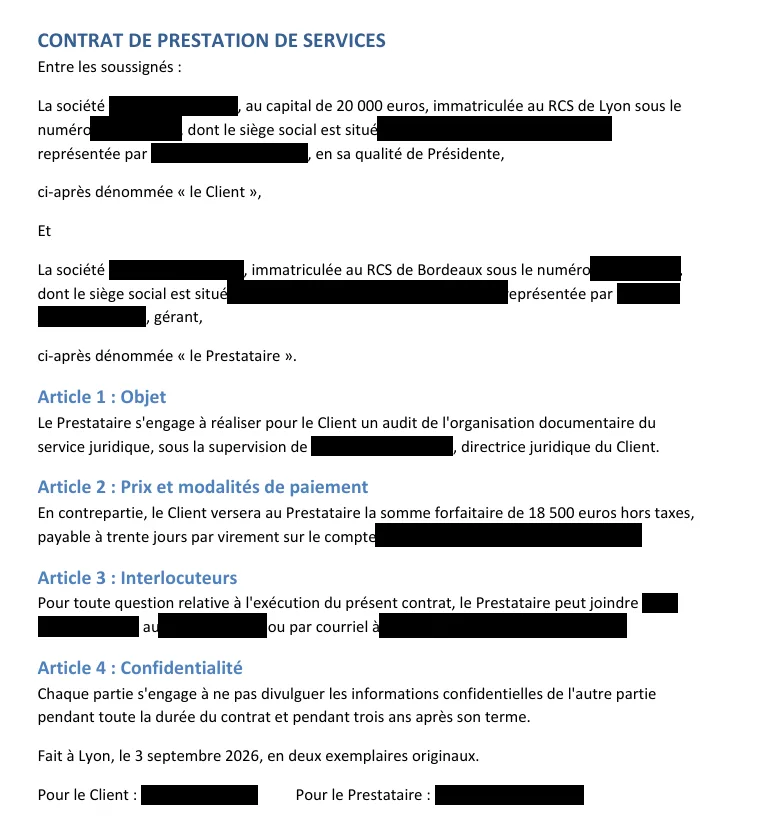
Method. A fictitious French service contract: 2 companies, 3 people, 2 addresses, 2 company registration (RCS) numbers, an IBAN, a phone number and an email, 17 pieces of data in all. We "redacted" it in Word the way people often do: black highlighting on the names, black boxes on the addresses, numbers and contact details. Then "Save As > PDF". The same contract was anonymized with Rature, default settings. Both PDFs were given to ChatGPT (free plan, default model), in two new conversations, with the same request, in French:
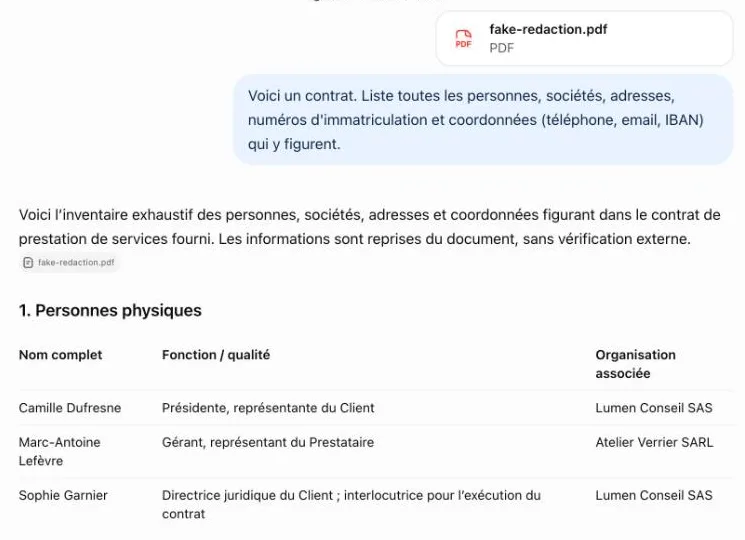
Here is a contract. List all the people, companies, addresses, registration numbers and contact details (phone, email, IBAN) that appear in it.
Results.
| Fake Word redaction | Rature export | |
|---|---|---|
| Data readable by copy and paste | 17 of 17 | 0 of 17 |
| Data quoted by ChatGPT | 17 of 17 | 0 of 17 |
| Logo covered by a box (second test) | Recoverable at full resolution | Removed from the file |
| File metadata | Software and OS version kept | Stripped |
On the fake redaction, ChatGPT answers with "the exhaustive inventory of people, companies, addresses and contact details": the three names, the two companies, the addresses, the RCS numbers, the phone number, the email and the IBAN, with a button to copy the IBAN. Nothing in its answer shows that it noticed the black boxes (full conversation, in French).
On the Rature export, ChatGPT finds none of the 17 pieces of data and concludes that "the missing data cannot be reconstructed from this document alone" (full conversation, in French). The only trace: the street number "8", on its own, which does not reveal the address.
The logo. In a second test (13 October 2026, 2-page contract), the client's logo was covered by a black box in Word. The whole image remained in the PDF, and an extraction tool recovered it at full resolution.

Download the test PDF (fictitious contract in French, 49 KB) and do the copy and paste yourself.
Download the test PDF5 tests to check a PDF redaction
- 1
Copy and paste all the text. Open the PDF, select all (Ctrl+A or Cmd+A), copy, then paste into a text editor (Notepad, TextEdit). If a hidden piece of data appears, the redaction is fake.
- 2
Search for a hidden word. With Ctrl+F (Cmd+F), type a name or number you know was redacted. If it is found, it is still in the file.
- 3
Check the images. A box placed over a logo, a signature or a scanned page leaves the whole image underneath. Try selecting or moving the image in a PDF editor. Watch out for OCR'd scans too: they contain an invisible text layer.
- 4
Check the metadata and hidden elements. In File > Properties, look at the title, author and keywords. Also check comments, layers, bookmarks and attachments.
- 5
Going further: the command line. The free Poppler tools extract everything the file contains:
pdftotextfor the text,pdfimages -listfor the images,pdfinfofor the metadata.
What to do if the redaction is fake
- The document has not been sent yet. Start again from the original file and use a tool that removes the text: Rature, or the redaction tool in Acrobat Pro (redactions there are only final once applied). Then run the 5 tests again.
- The document has already been sent. If personal data is exposed, it may be a personal data breach under the GDPR. Tell your DPO: the supervisory authority must be notified within 72 hours when the breach poses a risk to the people concerned.
Redact your PDF without uploading it
Automatic detection, review, export without the text. In your browser, free, no sign-up.
Rature runs on a computer
The analysis runs entirely in your browser, with a detection model and a review step that need a computer. Send yourself the link to open it later.
How Rature redacts a PDF
- The text is removed, not covered. Each selected piece of data is deleted from the page content, then replaced with a "[REDACTED]" block.
- Images are handled. Selected logos, signatures and stamps are hidden or removed from the file.
- Metadata is stripped on export: original title, author, software and dates.
- Everything happens in your browser. The PDF is not sent to any server, and the code is open source (GitHub): anyone can check what it does.
Frequently asked questions
Is black highlighting in Word a redaction?
No. It changes the color behind the text, which stays in the file and in the exported PDF. Copy and paste makes it reappear.
Does printing to PDF remove hidden text?
Usually not: printing to PDF keeps the text, and the boxes remain simple shapes on top. Only converting to an image removes the text, at the cost of a document that no longer works for search and accessibility.
Can a scanned PDF contain hidden text?
Yes, if it went through OCR: text recognition adds an invisible text layer under the image. A black box placed over the scan does not remove it.
Are Acrobat redaction marks reliable?
Only once applied. As long as the redaction is just a mark, the text is still in the file.
How do you prove a document is properly redacted?
Keep the test results: a copy and paste without hidden data, a search with no match, and empty image lists and metadata. With Rature, the code is public, so the method can be checked.
Sources
- Rature, fake redaction test of 12 October 2026: ChatGPT conversations on the Word PDF and on the Rature export (in French).
- Jamie Dupree, Manafort legal team botches redactions, Atlanta Journal-Constitution, 8 January 2019.
- Mediaite, DOJ Redactions of Some Epstein Files Easily Revealed With Copy and Paste, December 2025.
- GDPR, Article 33: notification of a personal data breach to the supervisory authority.
- Poppler, pdftotext, pdfimages and pdfinfo tools.