How to anonymize a PDF before giving it to ChatGPT
By Julien Kilo, creator of Rature · · 6 min read
Why anonymize a document before sending it to ChatGPT?
When you attach a PDF to ChatGPT, all of its text goes to OpenAI's servers. On personal plans (Free, Go, Plus, Pro), your conversations can be used to train the models as long as the "Improve the model for everyone" setting stays on (OpenAI help). Turning the setting off does not change the upload: the file still leaves your computer, and even a temporary chat can be kept for up to 30 days.
Regulated professions have stricter rules:
- Lawyers. The French national bar council (CNB) practical guide on generative AI (September 2024) sets a clear rule: a lawyer "must never communicate data covered by professional secrecy to generative artificial intelligence". It lists the name, address, phone number, financial information and "any specific detail of a case that could identify a person or a company" (our translation).
- Companies and public bodies. The CNIL, the French data protection authority, recommends governing the use of generative AI with a policy that, depending on the case, forbids sharing confidential or personal data, especially when the provider can reuse it (CNIL FAQ of 18 July 2024, in French).
- Everyone. The GDPR requires data minimization: only share the data the task needs. To summarize a contract or rephrase a letter, ChatGPT needs neither the names nor the IBAN.
What should you remove from the document?
| Data type | Examples | Detected automatically by Rature |
|---|---|---|
| Identity | First and last names, companies, organizations | Yes |
| Contact details | Addresses, postcodes, cities, emails, phone numbers | Yes |
| Identifiers | IBANs, social security, case, registration and land registry numbers | Yes |
| Dates and amounts | Dates of birth, exact dates, amounts | Yes, to check depending on context |
| Images | Logos, signatures, stamps, photos | To select in image editing |
| Indirect context | A unique role ("the only head of legal"), a project name, a precise place | No: that is your call during review |
| File metadata | Author, title, software, creation dates | Yes, stripped on export |
Indirect context is the most common trap. The CNB points it out too: even pseudonymized data can identify a client when cross-checked, for example an amount, an internal project name or the way a contract is drafted.
How to anonymize a PDF before ChatGPT, step by step
- 1
Open the PDF in Rature. Drop the file on the home page. It is read in your browser and sent nowhere. On first use, the detection model (about 400 MB) is downloaded once, then kept in cache.
- 2
Let detection find the data. An AI model spots names, companies, addresses, emails, phone numbers, IBANs and other identifiers. Each detection is highlighted in the document.
- 3
Review and correct. Remove what should not be hidden, add what is missing: a job title, a date, a case reference. When you select a name, every occurrence of it in the document is removed.
- 4
Handle the images. In image editing, hide logos, signatures and stamps. A logo that appears on every page is handled in one go.
- 5
Export, then check. The export replaces each piece of data with a "[REDACTED]" block, removes the text from the file and strips the metadata. Then copy and paste all the text: nothing hidden should reappear (see the 5 tests).
You can then give the exported file to ChatGPT. Say in your prompt that "[REDACTED]" replaces data removed on purpose: the assistant will not try to guess it.
Redact your PDF without uploading it
Automatic detection, review, export without the text. In your browser, free, no sign-up.
Rature runs on a computer
The analysis runs entirely in your browser, with a detection model and a review step that need a computer. Send yourself the link to open it later.
What ChatGPT sees after anonymization
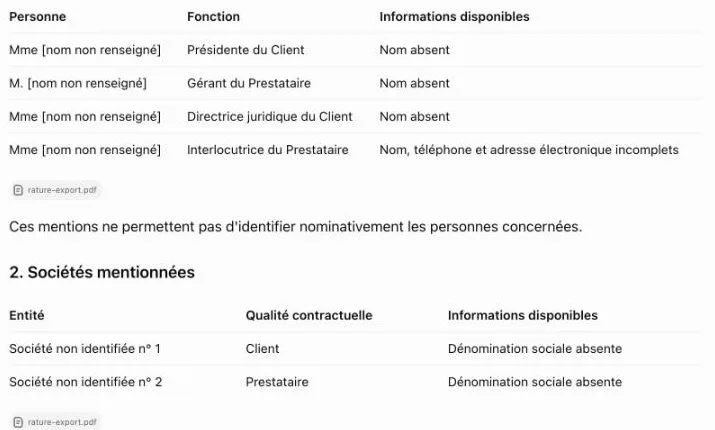
We gave ChatGPT (free plan, default model) the same fictitious contract in two forms, with the same request: list every person, company, address, registration number and contact detail.
- 17 of 17pieces of data read by ChatGPT under a fake Word redaction (black highlighting and boxes).
- 0 of 17pieces of data found in the Rature export.
On the Rature export, ChatGPT concludes that "the missing data cannot be reconstructed from this document alone" (translated from French). Yet it understood the essentials: the purpose of the contract, the 30-day payment term, the confidentiality clause and the role of each party. The document stays useful for analysis without identifying anyone.
Full method, files and ChatGPT conversations: how to check that a PDF is really redacted.
Anonymization or pseudonymization: what does Rature do?
Rature redacts: each selected piece of data is removed from the file and replaced with a black block. It is not pseudonymization, which would replace "Camille Dufresne" with a consistent alias such as "Person A". Replacement with pseudonyms is in the works in Rature.
What it changes in practice: ChatGPT cannot tell two hidden people apart. For most documents, the roles are enough ("the Client", "the Provider", "the President"). The CNB recommends pseudonymization for this need.
Mind the vocabulary: a redacted document is only anonymous, in the CNIL's sense, if no one can be identified anymore, even indirectly. Anonymization or pseudonymization: what is the difference?
Limits to know
- Scanned PDFs. Rature reads the text of the PDF. A scan without a text layer is not analyzed automatically.
- Word files. Save the document as a PDF first, then anonymize the PDF.
- Automatic detection. It can miss a piece of data or hide one too many. Reviewing before export is essential.
- Titles. "Ms" and "Mr" are kept by default: they reveal gender. Add them to the selection if needed.
Frequently asked questions
Is turning off training in ChatGPT enough?
No. The "Improve the model for everyone" setting stops your new conversations from being used for training, but the file is still sent to and kept by OpenAI. For a confidential document, the only protection is not to send the data.
Can I ask ChatGPT to ignore the names?
No. Once the file is sent, ChatGPT has already received the names. They have to be removed before sending.
Does ChatGPT Enterprise or Business change anything?
By default, OpenAI does not train its models on data from these plans. The documents are still sent to and stored by the provider: check the contract and the rules of your profession.
Does the method apply to Copilot, Gemini, Claude or Mistral's Le Chat?
Yes. All these assistants receive the content of the file you give them. Anonymize the PDF before sending it, whatever the tool.
Is Rature free?
Yes, with no sign-up and no usage limit. The code is open source under the AGPL license, and processing happens in your browser.
Can the hidden text be recovered from the export?
No. Rature removes the text from the file, it does not draw a box over it. Copy and paste or an extraction tool finds nothing under the hidden areas.
Sources
- Conseil national des barreaux (French national bar council), Guide pratique : utilisation des systèmes d'intelligence artificielle générative, 1st edition, September 2024 (in French).
- CNIL, Les questions-réponses de la CNIL sur l'utilisation d'un système d'IA générative, 18 July 2024 (in French).
- CNIL, L'anonymisation de données personnelles, 19 May 2020 (in French).
- OpenAI, Data Controls FAQ, accessed 21 October 2026.
- Rature, fake redaction test with ChatGPT, 12 and 13 October 2026.